

Available targeting methods in Telegram Ads depend on whether you're running your ad in the basic (TON) or advanced account (EURO). Let's look at how to set up targeting in each.
Main difference between basic (TON) and advanced account (EURO)
| Basic account Best for reach and simple channel promotion |
Advanced account Full campaign tool — optimize, track, scale |
|
| Ad destination | Channel, post, bot only | Includes everything from Basic, + ads linking to external websites |
| Ad formats | Text, image, video | Text, image, video, search, bots, mini-apps |
| Conversion tracking | No pixel or event data | Telegram Pixel + UTM |
| Targeting | Channels, search, bots | + Audience: geo, language, interests, device+ |
| Billing | TON crypto | EURO — card or invoice |
| Moderation | Self-service | Moderation with partner-level visibility and support |
Setting up a campaign in advanced account (EURO)
There are several targeting types on Telegram Ads: Target Search, Target Bots, Target Users, Target Channels. Targeting by multiple parameters at once is not possible. Each targeting type has its own set of customization options.
Target Search
You can specify keywords that your audience types in Telegram search so that your channel or bot appears in the results.
P.S.: here you only promote the link without the ability to add text to it.

Target Bots
Select specific bots and target their users.

Target Users
Geo targeting: Target users from specific countries and cities.
❗ The following geos are currently available in the Telegram Ads Euro-account: Russia, Uzbekistan, Kazakhstan, Kyrgyzstan, Tajikistan, Azerbaijan, Georgia, Armenia, Belarus, Brazil, Mexico, India, Indonesia, Turkey, UAE, Qatar, Saudi Arabia, Argentina, Colombia, Chile, and Peru.
Target user languages: Show ads to users who prefer a specific language (or who know and understand it). For example, if you select Kazakh, your ads will only be shown to users who have Kazakh selected in the app.
Target topics: Target users based on their interests. Telegram determines interests based on the topics of major public channels to which the user is subscribed.
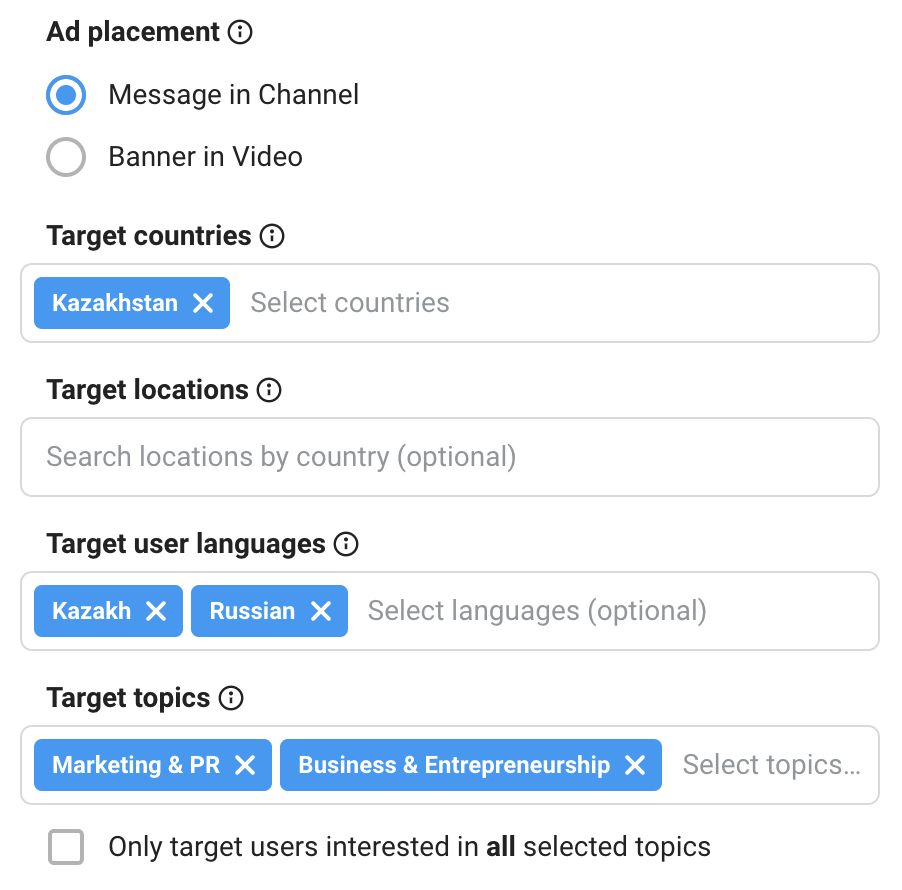
Target specific channels (their audience)
Target subscribers of a specific channel(s). Your ads will be shown to this audience across all channels they follow.

Target device type
Segment your ad audience by device type. Five options are available: All devices, iOS, Android, Desktop, and Mobile.

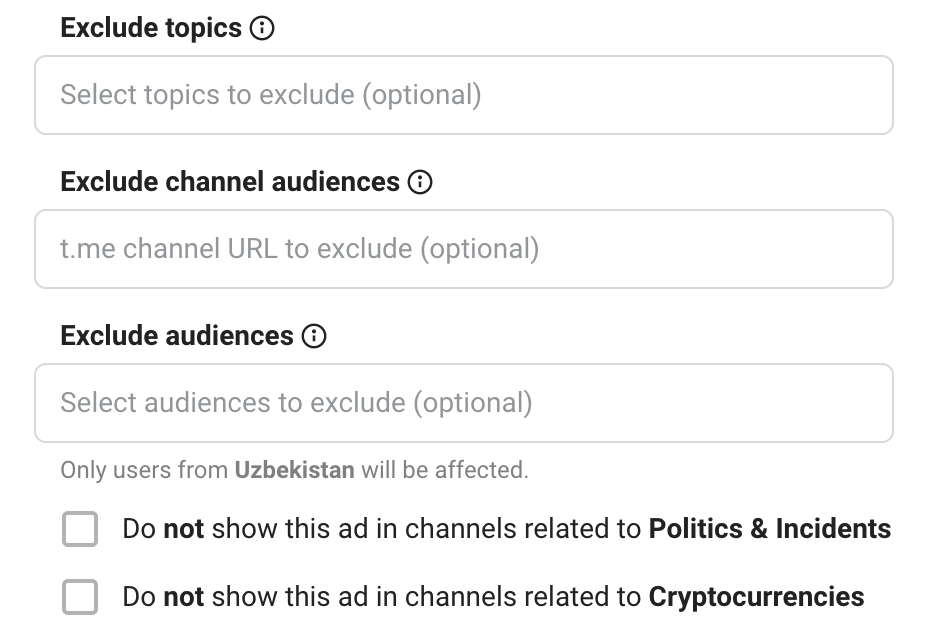
Exclusions
- users with certain interests
- subscribers of selected channels or custom audiences
- exclude placements in political, incident-related, or crypto channels
Target Channels
Channel language: Select the language for publishing content in the channels your target audience is likely to read.
Channel topic: You can narrow your audiences slightly by channel topic.

💡 Important: When setting up ads in Telegram Ads, it's important to combine the language and channel topic. If you want to show ads in channels with a specific topic, be sure to specify the language of those channels. However, you can't use the "language + specific channels" combination, as this will result in the ad appearing not only in the selected channels, but in all channels in the specified language.
Selecting specific channels: Target specific Telegram channels. Add up to 100 unique target channel addresses in the following format: evido_worldwide, without the @ and https.
Exclude topics and channels
Mark topics and channels in which you do not want ads to appear.

Four ideas for effective channel targeting
- Your own channel
Target your own channel to push out competitors’ ads and retain audience attention. - Competitors’ channels
Target competitor channels to attract and convert their subscribers. - Channels within your niche
Target channels directly related to your industry.
For example, if you sell real estate, focus on channels about interior design, construction materials, architecture, building, and property management. - Adjacent niche channels
Target channels from related fields where your audience is likely to be present.
For example, if you sell psychology courses, test targeting channels about yoga, nutrition, self-development, and healthy lifestyle (wellness).
Setting up a campaign in basic account (TON)
In TON Telegram Ads dashboards, you can only target specific channels.

❗ There are no other targeting restrictions in basic accounts. This means you can target all countries and languages, except for users located in Russia, Ukraine, Palestine, and Israel.
Here are a few rules for working with channel targeting in basic ad accounts:
- Channels (from 1,000 subscribers) are added manually using a channel link format.
- Telegram suggests similar channels based on the selected topic.
- It is not possible to edit the channel list in an active campaign — you need to create a copy with a different set of channels.
- You cannot view performance statistics for each individual channel — only at the campaign level.
- If you need channel-level statistics, you must create a separate campaign for each channel.
❗ Tip from the experts at Aitarget: it’s better to separate large channels into individual campaigns, while smaller ones can be grouped together.
- The campaign budget can be adjusted during its runtime. For example, if a campaign is underperforming, you can reallocate its budget to another campaign.
Adding an ad schedule
Telegram Ads allows you to set a schedule for ad delivery with precise configuration by hours and days of the week.
What’s available:
✔️ Selection of the time zone in which the schedule will be set (available for all ads).
✔️ Use of the viewer’s time zone (available for Target Users).

.jpg)


.jpg)

.png)